Exploring the User Interface
Sidebar
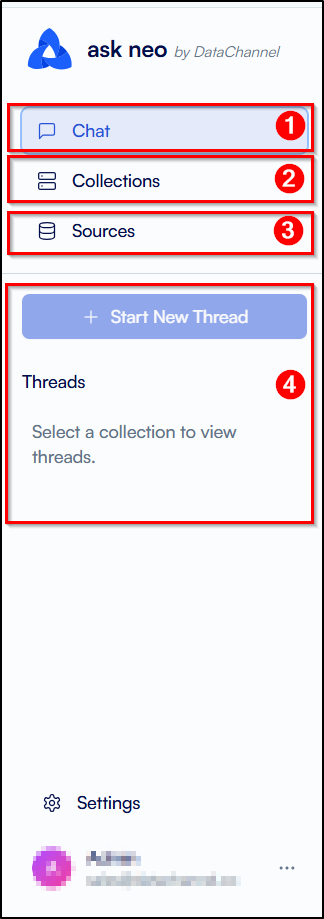
The vertical navigation bar on the left side of the platform is the sidebar and it allows you to navigate between different tabs to access various functionalities of the Neo platform. This is the starting point for all the functions you can carry out on the Neo by simply clicking on the required tab. You can also start a new thread or view the list of your previous threads after selecting a collection from the list of collections added by you. The sidebar is divided into the following tabs:
-
Chat: The Chat Tab is the first icon on the sidebar. Clicking on the Chat Tab allows you to view a list of all the collections added by you or you can add a new collection. You can also start a new thread or view the list of your previous threads after selecting a collection from the list of collections added by you. To get a better understanding of the Chat Tab click here.
-
Collections: The Collections Tab is the second icon on the sidebar, right below the Chat Tab. Clicking on the Collections Tab allows you to view a list of all the collections added by you or you can add a new collection. You can edit or delete an existing collection. To get a better understanding of the Collections Tab click here.
-
Sources The Sources Tab is the third icon on the sidebar, right below the Collections Tab. Clicking on the Sources Tab allows you to view a list of all the data sources added by you or you can create a new source by adding a new data warehouse or choosing from existing data warehouse in DataChannel. To get a better understanding of the Sources Tab click here.
-
Start New Thread: The Start New Thread Tab is the fourth icon on the sidebar, right below the Sources Tab. Clicking on the Start New Thread Tab allows you to start a new thread in any of the collections added by you. This tab is activated only when you have selected a collection.
Still have Questions?
We’ll be happy to help you with any questions you might have! Send us an email at info@datachannel.co.
Subscribe to our Newsletter for latest updates at DataChannel.