Familiarisation with the User Interface
Orchestrations
Overview
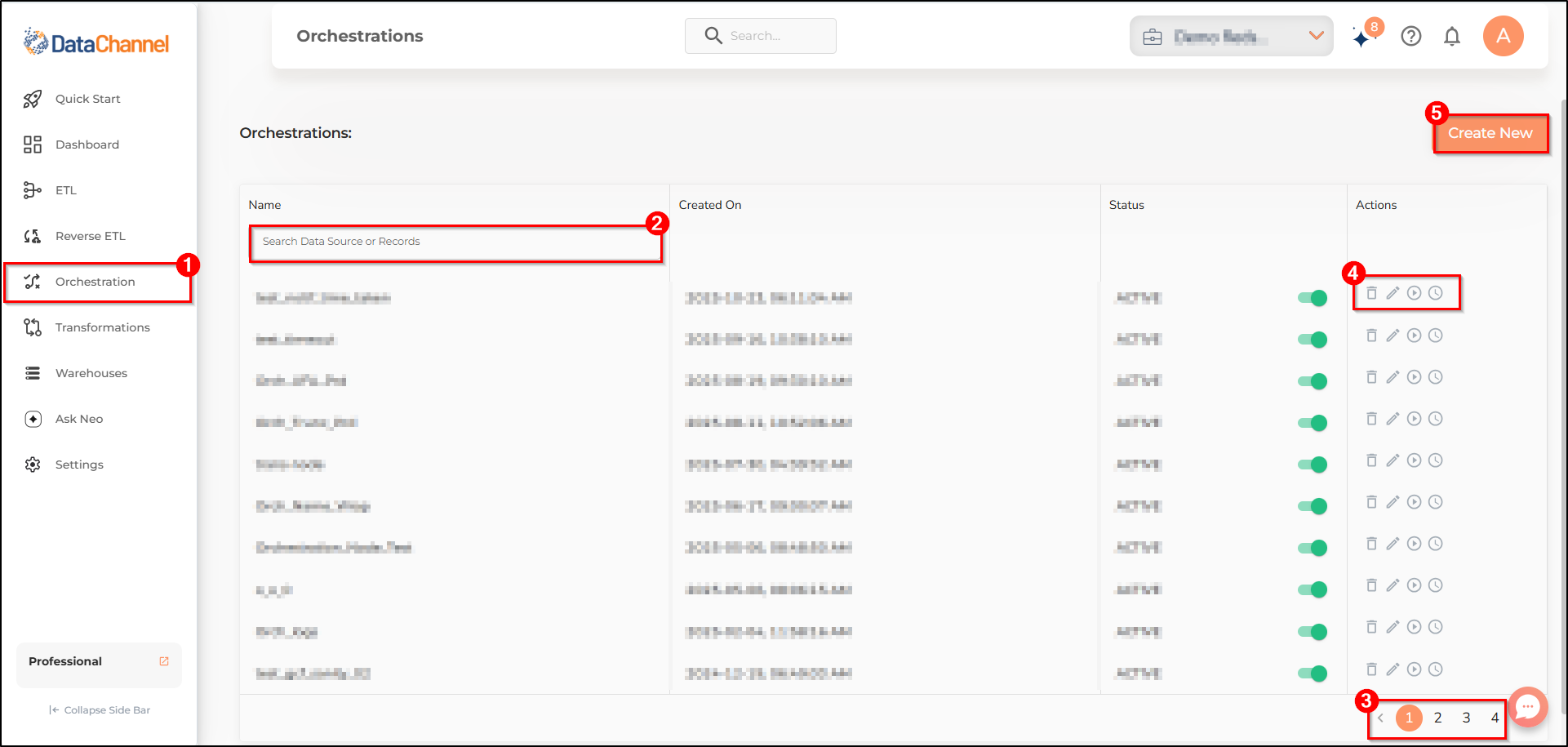
This section will help to familiarize you with the layout on the Orchestrations tab of the DataChannel Console. There could be scenarios where you need to perform certain orchestrations on your data. Using orchestrations, you can define workflows to automate complex data processing tasks. The Orchestrations Tab allows you to set up new orchestrations and edit existing ones.
-
Go to the Orchestration tab, fifth icon on the sidebar, right below the Reverse ETL Tab. it opens a list of all the orchestrations configured by you so far.
-
The search box inside the Orchestration page allows you to quickly find a specific Data Source or Records configured by you.
-
Navigating between different pages of the Orchestration card is possible through the page numbers on the navigation bar, near the bottom right corner of the Orchestration page.
-
The icons in the actions column of the Table allow you to Delete/Edit/Run/see the last run of a Data Model.
-
The Create New icon creates a new orchestration. It opens a new page where you can create a new orchestration by selecting the nodes.
You can learn the entire workflow of data orchestration here.
Still have Questions?
We’ll be happy to help you with any questions you might have! Send us an email at info@datachannel.co.
Subscribe to our Newsletter for latest updates at DataChannel.